

Format messages
@gramio/format is built-in GramIO package. You can also use it outside of this framework because it is framework-agnostic.
See also API Reference.
IMPORTANT
Do not use parse_mode with GramIO. The format template literal and entity helpers produce structured MessageEntity objects, not escaped HTML/Markdown strings. Setting parse_mode: "HTML" or parse_mode: "MarkdownV2" alongside @gramio/format output will break your messages. GramIO handles entity injection automatically — no parse_mode needed.
Format
Template literal that helps construct message entities for text formatting.
Use if you want to strip all of the indentation from the beginning of each line. (like common-tags#stripindents or dedent)
IMPORTANT
For formatting with arrays always use the join helper — never native .join().
format`some text`;
// or
format`${bold`Hmm...`} ${link(
    "GramIO",
    "https://github.com/gramiojs/gramio",
)}?`;
Let's send something...
bot.api.sendMessage({
    chat_id: 12321,
    text: format`${bold`Hi!`}

		Can ${italic("you")} help ${spoiler`me`}?

			Can you give me a ${link("star", "https://github.com/gramiojs/gramio")}?`,
});
FormatSaveIndents
Template literal that helps construct message entities for text formatting.
Use if you want to save all of the indentation.
IMPORTANT
For formatting with arrays always use the join helper — never native .join().
bot.api.sendMessage({
    chat_id: 12321,
    text: formatSaveIndents`${bold`Hi!`}

		Can ${italic("you")} help ${spoiler`me`}?

			Can you give me a ${link("star", "https://github.com/gramiojs/gramio")}?`,
});
Entities
Bold
Format text as bold. Cannot be combined with code and pre.
format`Format text as ${bold`bold`}`;
Italic
Format text as italic. Cannot be combined with code and pre.
format`Format text as ${italic`italic`}`;
Underline
Format text as underline. Cannot be combined with code and pre.
format`Format text as ${underline`underline`}`;
Strikethrough
Format text as strikethrough. Cannot be combined with code and pre.
format`Format text as ${strikethrough`strikethrough`}`;
Spoiler
Format text as
code and pre.format`Format text as ${spoiler`spoiler`}`;
Blockquote
Format text as blockquote. Cannot be nested.
format`Format text as ${blockquote`blockquote`}`;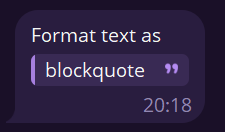
Expandable blockquote
Format text as expandable blockquote. Cannot be nested.
format`Format text as ${expandableBlockquote(loremIpsum({ count: 20 }))}`;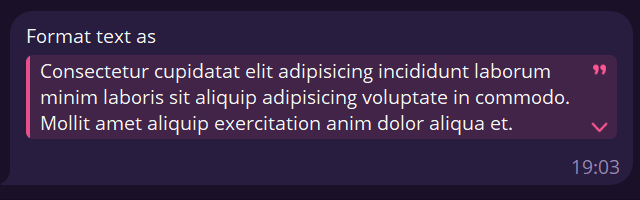
Code
Format text as code. Convenient for copied items. Cannot be combined with any other format.
format`Format text as ${code`code`}`;
Pre
Format text as pre. Cannot be combined with any other format. (Supported languages)
format`Format text as ${pre`pre`}`;
// or with language
format`Format text as ${pre(`console.log("pre with language")`, "js")}`;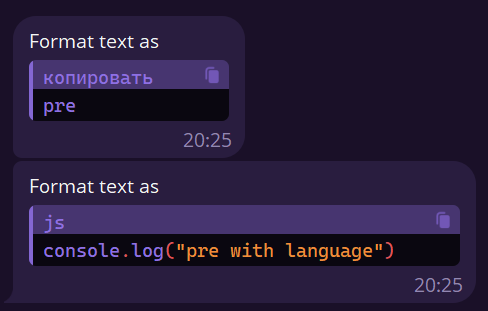
Link
Format text as link. Cannot be combined with code and pre.
format`Format text as ${link("link", "https://github.com/gramiojs/gramio")}`;
Mention
Format text as mention. Cannot be combined with code and pre.
format`format text as ${mention("mention", {
    id: 12312312,
    is_bot: false,
    first_name: "GramIO",
})}`;
🄲 🅄 🅂 🅃 🄾 🄼 ㅤ🄴 🄼 🄾 🄹 🄸
Insert custom emoji by their id.
format`text with emoji - ${customEmoji("⚔️", "5222106016283378623")}`;WARNING
Telegram now allows custom emoji for all bots if the bot owner has Telegram Premium and one of the following is true:
- the message is in the bot's private chat (DM) or a regular chat (not channels), or
- it's an inline query result where you edit the sent message afterwards (custom emoji aren't allowed in the initial inline result; edit the message to apply them). Previously this was only available to bots that paid for additional usernames (Fragment). Now the username purchase is no longer required under the conditions above.
Composing format templates
format returns a Formattable object — not a plain string. It tracks both the text and entity offsets. You can store it in a variable and embed it in another format template; entities will be correctly re-offset.
// ✅ Store result in a variable, then embed it
const greeting = format`Hello, ${bold`World`}!`;
const message = format`${greeting} ${italic`How are you?`}`;
// Bold entity from `greeting` is correctly shifted inside `message`
WARNING
Never interpolate a Formattable into a plain template literal. Calling .toString() (which happens in `${formattable}`) discards all entities and produces a plain string:
// ❌ Wrong — entities are lost
const a = `Hello, ${bold`World`}`;    // bold is stripped to plain text
const b = `${a} and ${italic`more`}`; // italic survives, bold is gone

// ✅ Correct — always use format``
const a = format`Hello, ${bold`World`}`;
const b = format`${a} and ${italic`more`}`;
Helpers
Join
Helper for correct formatting of arrays. Native Array.prototype.join() converts each element to a string via .toString(), which destroys all entity data.
WARNING
Do not use [...].join() with formattable values. Each entity function returns a Formattable object. Calling .join() on an array of them discards every entity, producing plain unstyled text:
// ❌ Wrong — every bold/italic/etc. is silently stripped
const text = items.map((x) => bold(x)).join(", ");

// ✅ Correct — use the join helper
const text = join(items, (x) => bold(x), ", ");
Separator by default is ,
format`${join(["test", "other"], (x) => format`${bold(x)}`, "\n")}`;HTML
You can convert HTML markup into Telegram entities using the htmlToFormattable function from @gramio/format/html sub-module.
This is useful when your content comes from a CMS, rich text editor (TipTap, ProseMirror), or an LLM that produces HTML output. The approach is the same as Markdown: parse locally into entities and send without any parse_mode. Invalid HTML degrades gracefully to plain text.
Installation
The HTML feature requires node-html-parser as a peer dependency:
npm install node-html-parseryarn add node-html-parserpnpm add node-html-parserbun add node-html-parserUsage
import { htmlToFormattable } from "@gramio/format/html";
import { Bot } from "gramio";

const bot = new Bot(process.env.BOT_TOKEN!);

bot.command("start", (ctx) => {
    const html = `<h1>Hello!</h1>
<p><strong>Bold</strong> and <em>italic</em></p>
<ul><li>item one</li><li>item two</li></ul>
<p>Visit <a href="https://gramio.dev">gramio.dev</a></p>`;

    ctx.send(htmlToFormattable(html));
});
Supported syntax
| HTML | Telegram entity |
|---|---|
<b>, <strong> | bold |
<i>, <em> | italic |
<u> | underline |
<s>, <del>, <strike> | strikethrough |
`<code>` | code |
<pre><code class="language-js"> | pre (with language) |
<blockquote> | blockquote |
<a href="..."> | text_link |
<h1>–<h6> | bold |
<ul>, <ol>, <li> | plain text with bullet/number |
<br> | newline |
Markdown
You can convert standard Markdown text into Telegram entities using the markdownToFormattable function from @gramio/format/markdown sub-module.
This is especially useful for:
- LLM output — language models (ChatGPT, Claude, etc.) naturally produce standard Markdown. You can pass their output directly to
markdownToFormattableand send it to Telegram with proper formatting. - Data from databases or external sources — when you store or receive Markdown text and need to render it in Telegram.
Unlike Telegram's built-in parse_mode (HTML or MarkdownV2), this approach won't break your message if the markup is invalid. Telegram's parse_mode will reject the entire message on a syntax error (e.g. an unclosed tag or unescaped character). With markdownToFormattable, the text is parsed locally into entities — if the markdown is malformed, it gracefully degrades to plain text instead of failing.
Installation
The markdown feature requires marked as a peer dependency:
npm install markedyarn add markedpnpm add markedbun add markedUsage
import { markdownToFormattable } from "@gramio/format/markdown";
import { Bot } from "gramio";

const bot = new Bot("");

bot.command("start", (context) => {
    context.send(
        markdownToFormattable(`**Hello** *world*!

> This is a blockquote

- **Bold** list item
- *Italic* list item
- [Link](https://gramio.dev)

\`\`\`js
console.log("code block with syntax highlighting")
\`\`\`
`)
    );
});
Supported syntax
| Markdown | Telegram entity |
|---|---|
**bold** | bold |
*italic* | italic |
~~strikethrough~~ | strikethrough |
`inline code` | code |
```lang ... ``` | pre (with language) |
[text](url) | text_link |
 | text_link (images become links) |
> blockquote | blockquote |
# Heading | bold (all levels) |
- item / 1. item | plain text with prefix |